AP inbox management is the discipline of running the shared mailbox where supplier invoices arrive: sorting every email, capturing and checking each invoice, and holding anything that changes money or bank details for a person to approve. Done well, nothing is lost, nothing is paid twice and nothing is paid to the wrong account. Done badly, the accounts inbox is the easiest way into your business’s bank account.
A disclosure before we start: I am the AI and Automation Lead at Dexterous Group, which builds dexIQ, one of the products I describe below. I have kept the rest of this guide product-neutral, and every control in it works with or without software.
Why the AP inbox matters more than it looks
Most finance leaders think of accounts payable as a ledger problem. In practice it starts as an email problem. Invoices, statements, remittance advices, supplier questions, reminders and tax office letters all land in one shared mailbox, usually something like accounts@ or ap@, and someone has to work out what each one is before anything else can happen.
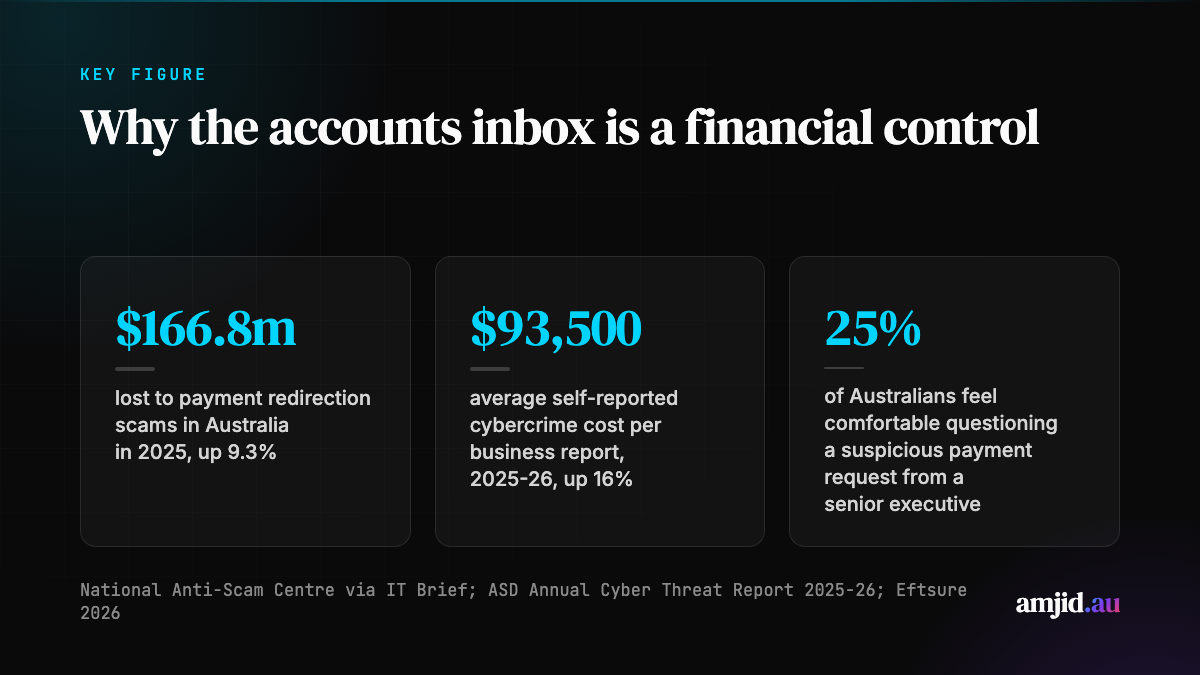
That mailbox is also where the fraud comes in. The National Anti-Scam Centre reports that payment redirection scams cost Australians $166.8 million in 2025, up 9.3% on the year before, at a time when most other scam categories were falling (IT Brief Australia, August 2026). Payment redirection is the scam where a genuine invoice is paid on time, to an account controlled by someone else, usually after a “please update our bank details” email.
The Australian Signals Directorate’s Annual Cyber Threat Report 2025-26, released on 27 October 2026, puts a number on the cost: the average self-reported cost of cybercrime per report for businesses rose 16% to $93,500. Small businesses averaged $55,400 per report, and medium businesses saw a 45% increase to $141,300 (Australian Cyber Security Magazine, October 2026). The ACSC received more than 82,000 cybercrime reports over the year, one every six minutes.
So AP inbox management is not housekeeping. It is a financial control.
What arrives in an AP inbox, and where each item should go
The first job is triage. Every email belongs to one of a handful of types, and each type has a different owner and next step.
| What arrives | What it is | Where it should go |
|---|---|---|
| Invoices and credit notes | A bill to pay, or a reduction of one | Capture, code, check, approve |
| Supplier statements | A list of what the supplier thinks you owe | Reconciliation against the bills you hold |
| Remittance advices | A customer telling you they have paid | Accounts receivable, to apply the receipt |
| Supplier or customer queries | A question that needs an answer | A person, with the history in front of them |
| Tax office correspondence | Notices, reminders, statements of account | Compliance review |
| Bank detail changes | A request to pay a different account | Held for a person, verified out of band |
| Noise | Newsletters, marketing, duplicates | Archive |
Two rules make this table work. First, every email gets a type, even if the type is “noise”. Unread emails are where invoices go missing and where late fees start. Second, the original email stays linked to whatever it became: the bill in the ledger, the reconciliation or the reply. When an auditor or a supplier asks “where is that invoice?”, the answer should take seconds.
The checks every invoice should pass
Once an email is identified as an invoice, it should go through the same checks every time, in the same order, whoever is on leave. A sensible minimum for an Australian business:
- Supplier match. Is this a supplier you already pay? A new supplier needs onboarding before payment, not after.
- ABN check. Does the ABN on the invoice match the supplier record and the Australian Business Register, and is the business still active?
- GST and totals. Do the lines add up, and is GST charged correctly for a GST-registered supplier?
- Duplicate check. Have you already received this invoice number, or the same amount from the same supplier, in recent months? Resent invoices are the most common way to pay twice.
- Bank details. Do the bank details on the invoice match the supplier record? If not, stop. This is the check that catches payment redirection.
- Coding. Is the invoice coded to the right account and tracking category, ideally consistent with how this supplier was coded before?
- Approval. Has the right person approved it, within their limit?
None of these checks are new. What fails is doing all seven, every time, on the 200th email of the week. That is where people get tired and attackers get lucky.
How to handle bank detail changes safely
If you change one thing after reading this, change how you handle bank detail changes. The advice from Australian practitioners is consistent: never act on a change of bank details from an email alone (IT Brief Australia).
- Confirm through a second channel. Call the supplier on a number you already hold, not the one in the email or on the new invoice.
- Check the account name. Confirmation of Payee matches the account name to the BSB and account number. Your bank now runs this when you pay someone new; use it on supplier changes too.
- Separate duties. The person who approves a payment should not be the person who releases it, and neither should be able to change a supplier’s bank details alone.
- Keep an audit trail. Every change should record who requested it, who verified it, how, and when.
The human side matters as much as the process. Eftsure’s 2026 survey found only 25% of Australians feel comfortable questioning a suspicious payment request from a senior executive, and 32% feel pressure to process payments quickly at work (Eftsure Payment Fraud Index). Make it explicit, in writing, that the AP officer who pauses a payment is doing their job, even when the request appears to come from the CEO.
What AI changes in AP inbox management
AI cuts both ways here. On the attack side, the ASD’s 2025-26 report describes AI as lowering the barrier to more convincing phishing and impersonation, and 90% of Australians in Eftsure’s survey believe AI-generated scams are harder to detect. The old giveaways, poor grammar and odd formatting, are disappearing. Spotting a fake by eye is no longer a control.
On the defence side, AI agents are now good at exactly the work that wears people down: reading every email as it arrives, classifying it, pulling the supplier, ABN, invoice number, dates, GST and lines out of a PDF or a scan, and running the same checks on the 200th invoice as on the first. I have written about connecting Xero to AI with the Xero MCP server and about what AI means for CFOs in 2026; the AP inbox is one of the clearest places that value shows up.
dexIQ, from Dexterous Group, is one example built for Australian businesses. Its inbox management connects to a Microsoft 365 or Google Workspace accounts mailbox, reads each message as it arrives and routes it: invoices and credit notes to the accounts payable agent, statements to reconciliation, remittances to receivables, queries to a person with a drafted reply, tax office letters to compliance review, and noise to the archive. On the AP side, dexIQ describes ABN verification against the ABR, GST and total checks, duplicate detection and flags for changed bank details on every invoice, with bills posted to Xero once a person approves them. Bank detail changes are held for a person, and by default nothing is posted without human approval.
Whatever tool you look at, these are the questions I would ask:
- Does it keep a person in the loop by default? Automation within limits you set is fine. A system that releases payments or changes bank details on its own is not.
- Does it explain its decisions? You should see why an invoice was coded the way it was, and which check flagged it.
- Where does the data live? Supplier invoices carry bank details and personal information. Ask where it is stored and who can access it; our AI agent security controls guide has a fuller checklist.
- Does it work with your mailbox as it is? Suppliers should keep emailing the same address. A product that needs every supplier to change behaviour will not get used.
Where e-invoicing fits
Peppol e-invoicing sends invoices directly between accounting systems through accredited access points, so there is no PDF to intercept or edit on the way. It is growing, particularly for invoices to government, but business-to-business use in Australia is still voluntary, and most supplier invoices still arrive by email. Plan for both: take e-invoices where suppliers can send them, and keep the AP inbox well run for everything else. The checks above apply to both channels, because a fraudulent bank detail change can arrive by phone or email whatever format the invoice comes in.
A 30-day plan for your AP inbox
If your accounts inbox is a pile rather than a process, this is a realistic month:
- Week 1: measure. Count what arrives in a normal week by type, how long each takes and how many emails sit unread for more than two days.
- Week 2: set the rules. Write down the triage table and the seven checks above, with an owner for each type. Put the bank detail change procedure in writing and tell your suppliers about it.
- Week 3: fix the controls. Separate approval from payment release, switch on any bank detail mismatch alerts your accounting or payments software already has, and start an audit trail of supplier changes.
- Week 4: decide on automation. With volumes and rules written down, you can judge an AI inbox product properly: does it follow your rules, keep your people in control and save the hours you measured in week one?
If you work with an external bookkeeper or accountant, bring them in from week one; our guide on AI for Australian accountants covers how many firms are already approaching this.
The AP inbox is unglamorous, and that is exactly why it is attacked. A clear triage, the same checks on every invoice, and a firm rule on bank detail changes will do more for your cash than most finance projects this year.